
Download Fruits Coloring Book – coloring book, kids activity, creative relaxation, fun coloring, family entertainment, digital coloring, easy coloring app, coloring for adults, coloring game
Overview
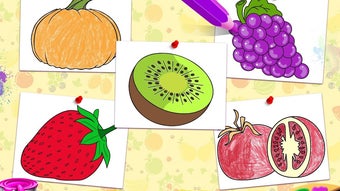
The Fruits Coloring Book is a free Android application developed by Fabulous Fun, designed to offer a simple and engaging way to unwind and express creativity. The app presents a digital coloring experience centered around fruit-themed illustrations, allowing users to explore their artistic side through a user-friendly interface. It serves as a tool for relaxation and mental respite, particularly suited for individuals seeking a low-pressure, enjoyable activity to counter daily stress. The target audience spans across age groups, including children, teenagers, and adults, making it a versatile choice for family entertainment.
Users can engage in coloring by selecting from a palette of colors and applying them directly to the illustrations. The inclusion of a pencil tool enables freehand drawing, adding a layer of personalization and creative freedom. An integrated eraser function allows for immediate corrections, enhancing the overall usability and reducing frustration during the coloring process. Completed artworks can be saved locally or shared across social media platforms, promoting the sharing of creative expressions. The app’s straightforward design ensures accessibility for users of all skill levels, particularly those new to digital art or looking for a casual pastime.
Key Features & Capabilities
- Fruit-Themed Coloring Pages – Offers a variety of illustrations centered around different fruits, providing a thematic and visually appealing experience.
- Color Selection Tool – Allows users to choose from a range of colors to fill in the outlines, supporting personal expression and artistic experimentation.
- Pencil Drawing Function – Enables freehand sketching directly on the canvas, expanding the creative possibilities beyond simple coloring.
- On-Canvas Eraser – Provides the ability to erase mistakes or adjust drawings directly on the page, improving workflow efficiency.
- Save and Share Options – Completed artwork can be saved to the device or shared on social media, allowing users to showcase their creations.
- Simple, Intuitive Interface – Designed with ease of use in mind, minimizing the learning curve for new users.
These features support a seamless experience for users who want to enjoy digital coloring without technical complexity. For example, a child can use the color picker to fill in a strawberry illustration, while an adult might use the pencil tool to add shading or decorative elements. The ability to save and share encourages continued engagement and social interaction around creative output. The app’s focus on simplicity ensures that users can begin creating immediately, making it ideal for short breaks or extended creative sessions.
User Interface, Workflow & Performance
The user interface of Fruits Coloring Book is structured around a clean, minimal layout focused on the coloring canvas. Navigation is straightforward, with tools such as color selection, pencil, and eraser positioned for easy access. The workflow is linear and intuitive: users open a page, select a tool, and begin coloring or drawing. This design reduces cognitive load and supports immediate engagement, particularly beneficial for younger users or those unfamiliar with digital art tools.
While the developer did not specify resource usage details, the app’s 35.4 MB size suggests a lightweight footprint, which typically correlates with efficient performance on modern Android devices. The app’s performance is expected to remain stable during typical usage, such as coloring and saving images, though actual behavior may vary based on device hardware. No information was provided regarding CPU or RAM consumption. The absence of reported crashes or lag in user feedback indicates a generally reliable operation, though real-world testing data was not included in the provided information.
Compatibility & System Requirements
Fruits Coloring Book is designed for Android operating systems, with version 1.0.1 currently available. The application has a file size of 35.4 MB, indicating a compact installation footprint. The developer did not provide additional system requirements, such as minimum RAM, processor specifications, or Android version compatibility. As such, platform compatibility information is limited to the OS type, and users should verify device compatibility through the Google Play Store or official distribution channel.
Given the app’s size and purpose, it is likely to function on most Android devices released in the last several years. However, without explicit details on required Android versions or hardware specifications, users are advised to consult official sources for accurate compatibility checks. The lack of detailed system requirements may affect users with older or less common devices, though the app’s simplicity suggests broad accessibility.
Pros and Cons
Pros
- Free to download and use, with no in-app purchase prompts mentioned.
- Simple and intuitive interface suitable for all ages.
- Offers both coloring and freehand drawing capabilities.
- Includes on-page eraser for immediate corrections.
- Allows saving and sharing of completed artwork.
- Thematic fruit illustrations provide visual variety and engagement.
Cons
- Exact system requirements were not listed.
- No advanced features such as layers, undo history, or brush customization.
- Limited to Android platform; no availability on iOS or desktop.
- May lack features desired by more advanced digital artists.
- Performance details were not provided.
FAQ Section
Is Fruits Coloring Book available for iOS devices?
The app is currently available only for Android. There is no information provided about an iOS version.
Can I use Fruits Coloring Book offline?
Yes, once downloaded, the app can be used without an internet connection, as it does not require online access for core functionality.
Is the app safe to download?
As the app is distributed through official Android channels and developed by Fabulous Fun, it is considered secure. However, users should always download from trusted sources.
Are there in-app purchases or ads?
The app is listed as free, but specific details about ads or in-app purchases were not included in the provided information.
How often does Fruits Coloring Book receive updates?
The latest version is 1.0.1, released on August 15, 2024. No information was provided about the update frequency or future release schedule.
Final Thoughts + CTA
Fruits Coloring Book delivers a straightforward, accessible digital coloring experience tailored for users seeking creative relaxation and family-friendly entertainment. Its simplicity, combined with core tools like color selection, drawing, and erasing, makes it ideal for children, teens, and adults alike. While it lacks advanced features, its focus on ease of use and immediate engagement sets it apart as a reliable choice for casual coloring enthusiasts. The ability to save and share artwork adds a social dimension, enhancing the overall appeal.
For those looking for a free, lightweight app to unwind or engage in a fun activity with family members, Fruits Coloring Book offers a solid option. Its minimal system demands and intuitive design ensure broad usability across Android devices. While it may not satisfy users seeking professional-grade tools, it fulfills its purpose effectively within its scope.
Download Fruits Coloring Book now




.png)


